
Thank you so much for purchasing a HowJoyful License to sell products using my tutorials, patterns, or SVG cut files. I appreciate the support!
Now that you have already made a payment, you will need to activate the license by signing and emailing the license agreement.
There are two different activations on this page; please download and follow the steps of the correct one:
1 – Activation license for patterns
2 – Activation license for SVG files
ACTIVATION FOR PATTERNS
REQUIRED INFORMATION
Now that you have received the confirmation of your payment, all you need to do is to print this PDF and fill out the required information:
- Transaction ID: This can be located on your email confirmation from Wave or PayPal depending on the license.
- Name: Your or your business name.
- Email: email used to make the payment.
- Date: The date of your transaction; this can also be found in your confirmation just above the transaction ID.
- Number of items: Please add the number of items you selected to purchase a license for
- Pattern Design: Write down the title of the pattern you are planning to use to create items for sale.
- Signature: We just need your signature to make your license valid.
DOWNLOAD THE PDF

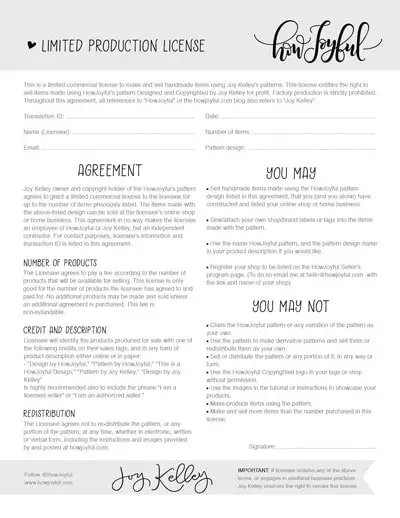
(click on image to open)
If you have problems with the PDF version of the document, please try this JPG instead. Thank you!
OPTIONAL INFORMATION
If you would like for us to list you on our authorized seller list, just let us know the link and name you wish to use when you email your license agreement.
IMPORTANT
Once you have filled out the agreement, please scan or take a picture with your cell phone (make sure all the details are legible) and email it to hello@howjoyful.com to make it valid. (Please use the subject “License Activation“)
Thank you so much, and happy creating!
ACTIVATION FOR SVG FILES
REQUIRED INFORMATION
Now that you have received the confirmation of your payment (via PayPal), all you need to do is to print this PDF and fill out the required information:
- Transaction ID: This can be located on your email confirmation from PayPal, which is a long number located on the top right, usually in blue.
- Name: Your or your business name
- Email: email used to sign in to PayPal
- Date: The date of your transaction; this can also be found in your confirmation just above the transaction ID.
- Number of items: Please add the number of items you selected to purchase a license for
- Pattern Design: Write down the title of the pattern you are planning to use to create items for sale.
- Signature: We just need your signature to make your license valid.
DOWNLOAD THE PDF
(click on image to open)
If you have problems with the PDF version of the document, please try this JPG instead. Thank you!
OPTIONAL INFORMATION
If you would like for us to list you on our authorized seller list, just let us know the link and name you wish to use when you email your license agreement.
IMPORTANT
Once you have filled out the agreement, please scan or take a picture with your cell phone (make sure all the details are legible) and email it to hello@howjoyful.com to make it valid. (Please use the subject “License Activation“)
Thank you so much, and happy creating!

